
This page provides instructions to setup the Borland License Server to accompany the purchase of concurrent or named user product licenses.
All four steps have to be completed in order to run the server successfully. If you have already installed the current version of the server and need to add more licenses, go directly to the Step 4.
| Platform | Release Date |
Version |
|---|---|---|
| Solaris | October 15, 2007 | 4.03 |
| Linux | October 15, 2007 | 4.03 |
| Windows XP, 2003, Vista | October 15, 2007 | 4.03 |
IMPORTANT: If upgrading to a newer version of Borland License Server, please
backup currently installed files before unpacking an archive because unpacking
an archive may overwrite important files such as belise/conf/userlist.txt
and belise/conf/userlist-concurrent.txt
.
Unpack the archive to a directory on the server.
You must have Sun's Java Development Kit or Java Runtime Environment (JDK/JRE 1.4) installed
on your system (see
http://java.sun.com/j2se/
for more information). Once installed, you should set the JAVA_HOME variable in
your system environment to point to your installed JDK/JRE.
set JAVA_HOME=c:\jdk1.4.0
to set the JAVA_HOME variable to the absolute path c:\jdk1.4.0
export JAVA_HOME=/usr/java/jdk1.4.0
to set the JAVA_HOME variable to the absolute path /usr/java/jdk1.4.0.
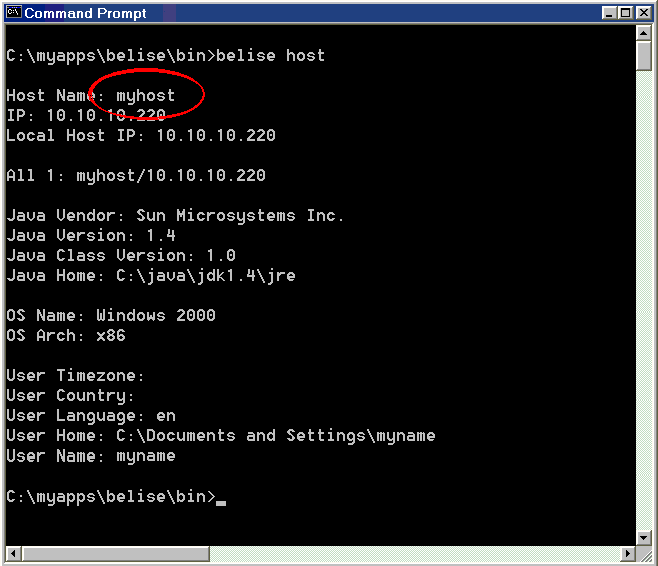
From the belise/bin directory, run the host utility:
belise host (on Windows) or belise.sh host (on
UNIX). Make a note of the host name.
The process of generating configuration files is called "hosting." Please use the login name and password provided with your License Certificate to access Borland's hosting Web site. The exact host name derived in the previous step is required to host successfully.
Click here to host licenses to a server:
Note for existing TogetherSoft products customers : A toolkit has been provided to help reduce the amount of work involved with migrating user information from the Together Floating License Server to the Borland License Server. Instructions are included in the archive:
migration_toolkit.zip (Windows)
migration_toolkit.tar (Solaris, Linux)
If you encounter errors or technical difficulties with the installation of this
software, please contact Borland technical support at
http://support.borland.com.